AVAILABLE
Streamlining Audit Evidence Collection

Overview
AuditCue is a compliance management platform used by auditors, compliance officers, and internal teams to manage end-to-end audits across frameworks such as ISO, SOC2, RBI guidelines, and internal policies.
This case study outlines how I re-evaluated the existing evidence submission workflow to uncover where auditors and auditees were struggling in real scenarios and how I redesigned key parts like evidence clarity, reuse, feedback, and review—making the process faster, clearer, and less frustrating for everyone involved.
The Background
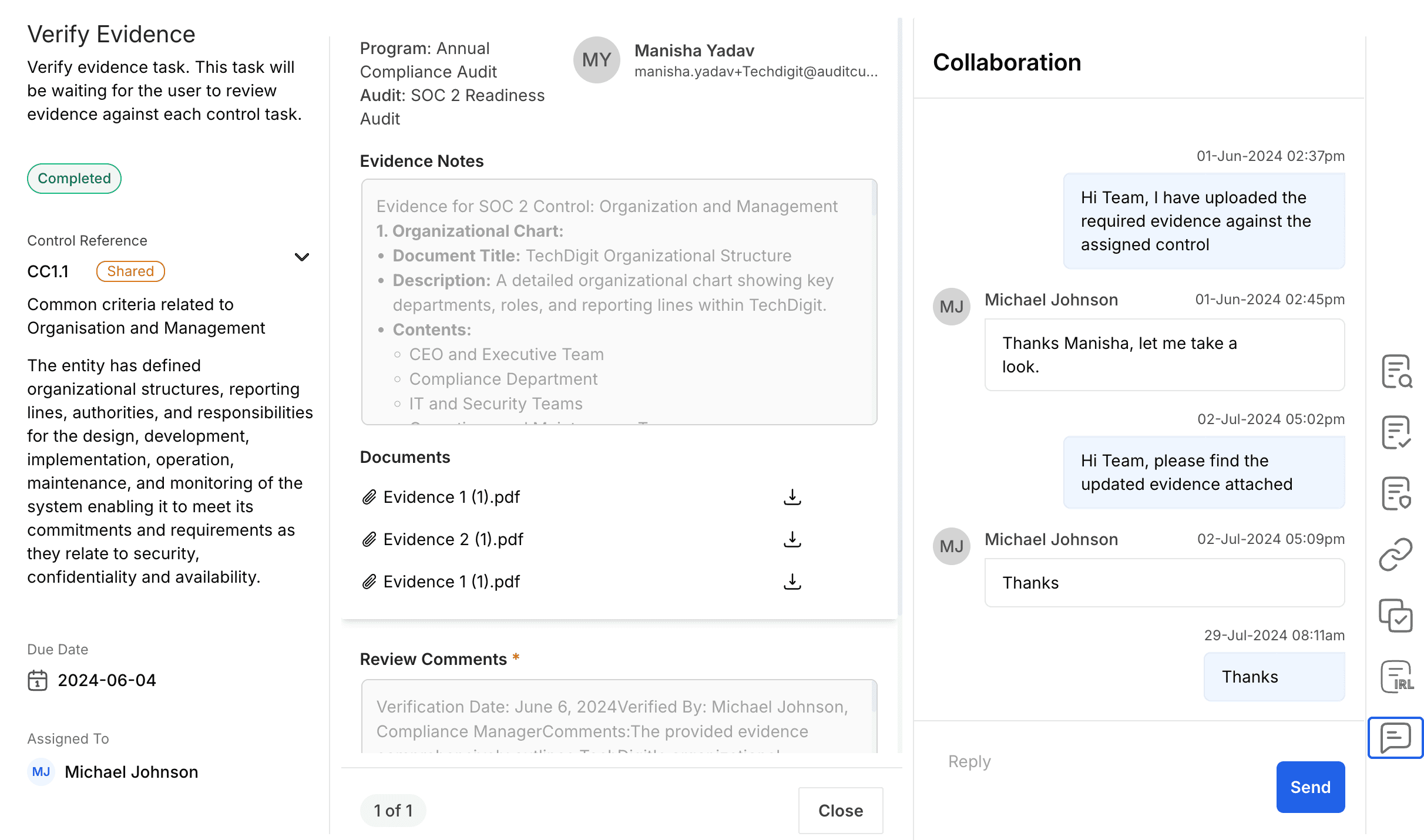
When I joined the team as the UX Designer, the evidence submission module had already been functioning for some months, but the team had begun observing friction on both sides—auditors and auditees were taking more time than expected to complete tasks, support queries were increasing, and workflows were not as intuitive as intended.
The evidence collection experience felt disconnected and heavy, forcing users to spend more time managing tasks than focusing on audit quality.
Challenges
Based on our conversation with customers, our internal audit team and analyzing support tickets the challenges faced by auditors and auditees are
Audit cycles took longer than necessary due to repeated clarifications and rework.
Auditees spending extra time preparing, submitting, and revising evidence, pulling focus away from their core work.
Auditors had to invest more effort reviewing submissions, slowing down verification and decision-making.
Miscommunication and missed context increased the number of back-and-forth interactions.
Inconsistent evidence quality made audits harder to standardize across teams and time periods.
Support and implementation teams had to step in more often to guide users through the process.
Overall confidence in the audit workflow decreased, even though the system was functionally complete.
Clearer evidence expectations
Most issues during verification traced back to the very first step—auditees often struggled to understand what exactly they were expected to submit.
Pain points on evidence submission
Spending more time searching for the “right” evidence
Frequently uploaded incomplete or irrelevant documents
Needed multiple clarifications from auditors
Took 3–5x longer to complete evidence tasks for controls reused across many audits
This caused a chain reaction: frequent “wrong evidence” submissions → more rework → delays in audit cycles.
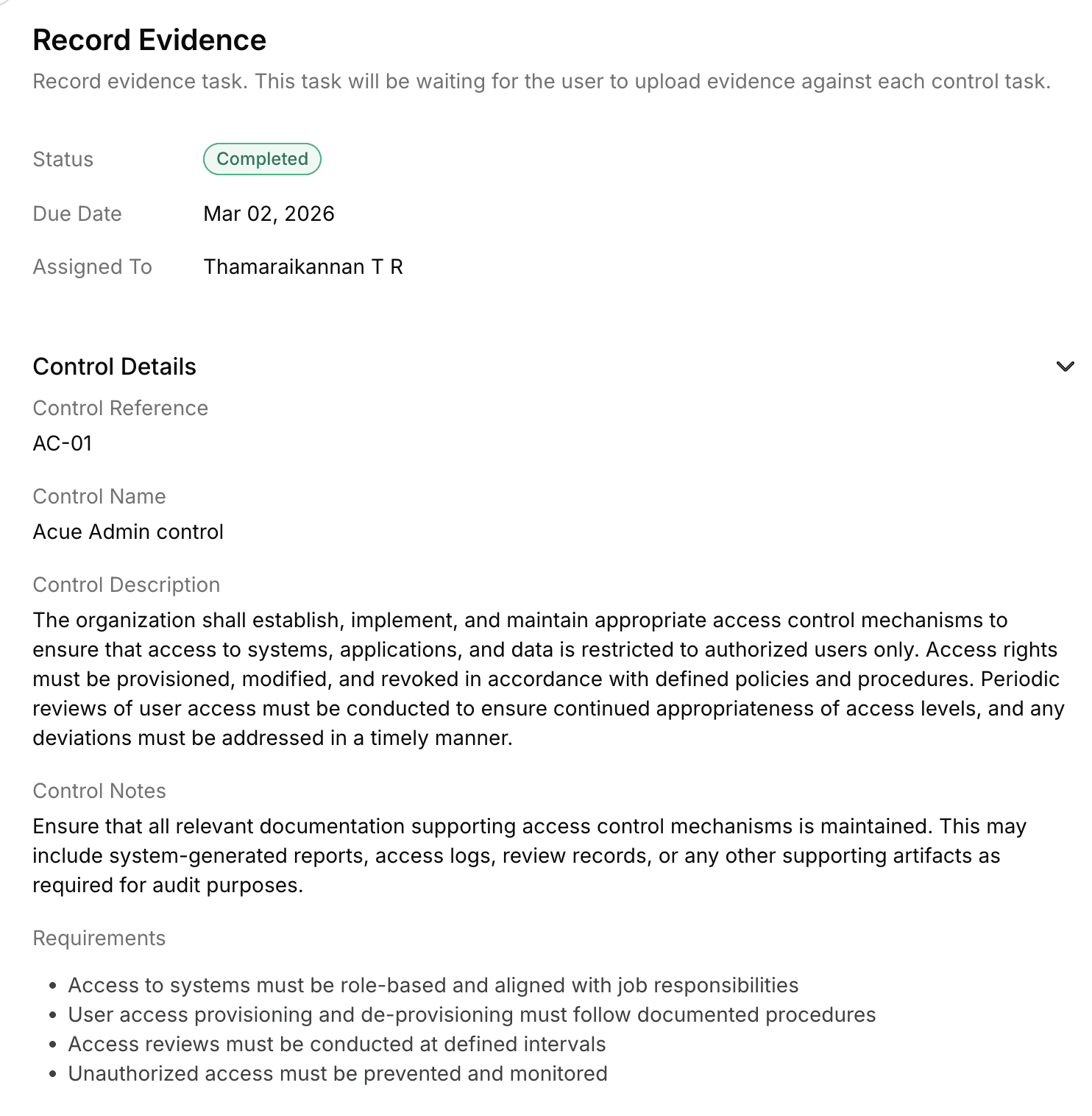
Low clarity on what evidence is needed
Control descriptions were fetched directly from compliance frameworks
Control descriptions were long, technical, and not action-oriented.
Evidence expectations were buried under detailed framework language.
Make evidence expectations clear and actionable
Auditees should immediately understand what evidence is needed for each control—without guessing, over-submitting, or depending on clarifications.
What we aimed to achieve
Clear, readable control descriptions
Action-oriented guidance (“What good evidence looks like”)
Example references where applicable
Reduce wrong submissions and back-and-forth clarifications
How this translated into design
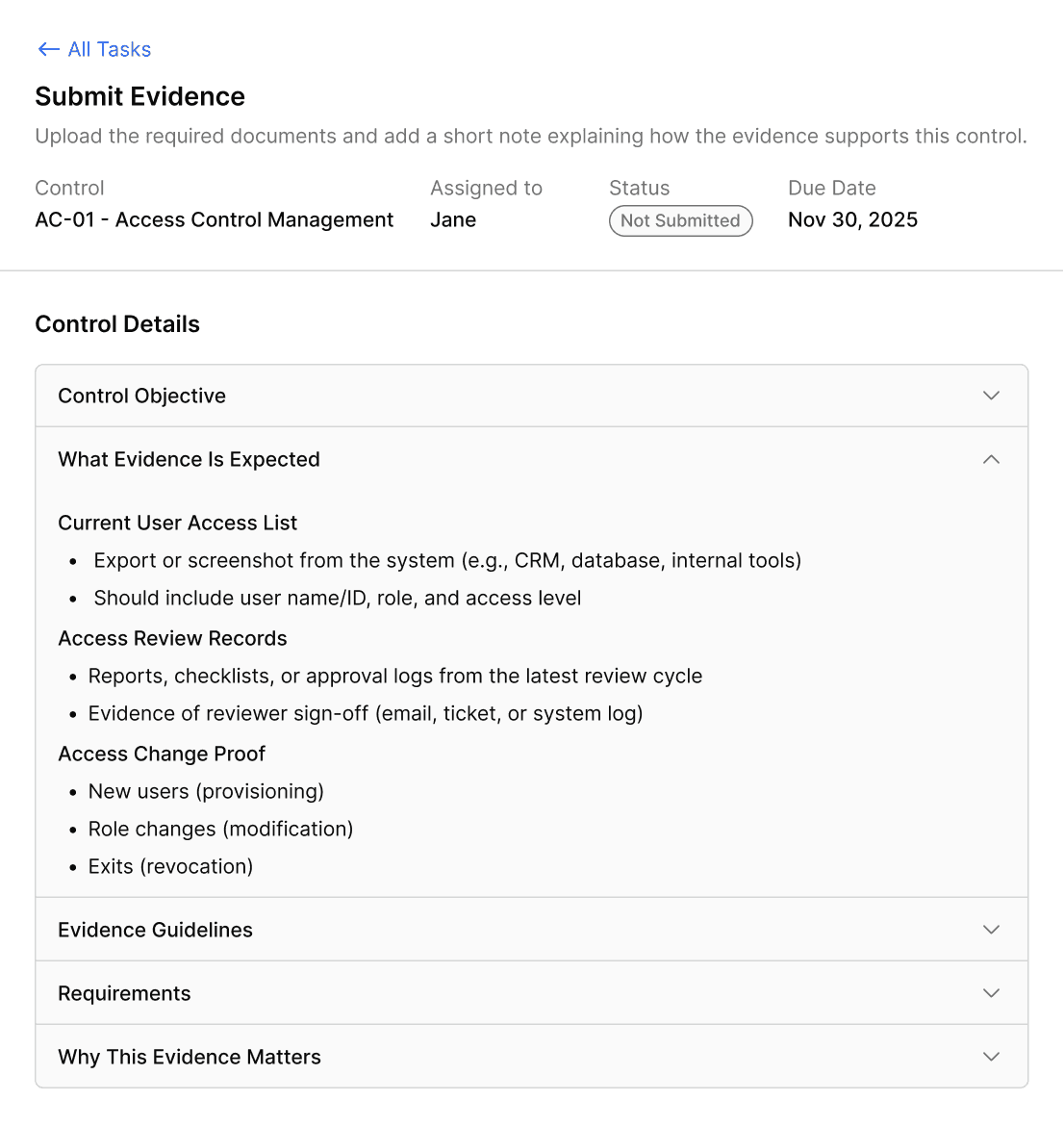
I introduced a clearer structure around control context:
Broke long control descriptions into short, readable paragraphs
Added a dedicated “Evidence Expectations” section
Included guidance like: What type of document is expected, What time range it should cover, What an auditor will verify in this evidence
Allowed space for examples or references when applicable
Impact On Auditees
Auditee no longer have to interpret lengthy control descriptions — they get immediate actionable guidance. This reduces time spent clarifying with auditors and minimizes incorrect submissions.
Unified Evidence List
In the existing workflow, auditees were asked to submit evidence for a control in two ways:
Upload new files directly to the task
Reuse evidence submitted in previous audits by navigating through a paginated list
While functionally complete, this flow placed a high cognitive burden on users—especially in mid to large audits where a single control could have 20–50 historical evidence items.
What was actually breaking down
I step back and re-evaluated the entire submission experience from the auditee’s perspective, rather than iterating on individual UI issues. I noticed following recurring breakdowns:
Submission felt fragmented and exhausting
To complete a single submission, an auditee had to:
Upload new evidence on one screen
Navigate through multiple pages to review reusable evidence
Toggle each evidence individually to include evidence used on other audits.
Reach the submit action only after reviewing all evidences used on other audits
This turned a simple compliance task into a repetitive, time-consuming process—especially when the user already knew which evidence they wanted to reuse.
No visibility into what had been added
Once evidence was uploaded or selected:
There was no single place to see all evidence attached to the task
Users couldn’t quickly confirm if they had added the “right” documents
Notes were disconnected from individual evidence items
This created anxiety before submission—users were unsure whether their work was complete or correct.
How I Approached the Solution
Instead of asking “How do we improve this screen?”, I reframed the problem as: “How might we help auditees confidently submit the right evidence with minimum effort?”
This led to three guiding principles:
One place to act – No forced navigation between pages
One place to review – Clear visibility of what’s included
1. Unified Evidence List (Single Source of Truth)
All evidence — whether newly uploaded or linked from a previous audit — is displayed in one unified list on the Submit Evidence screen. Users no longer need to mentally track what they have added across separate screens.
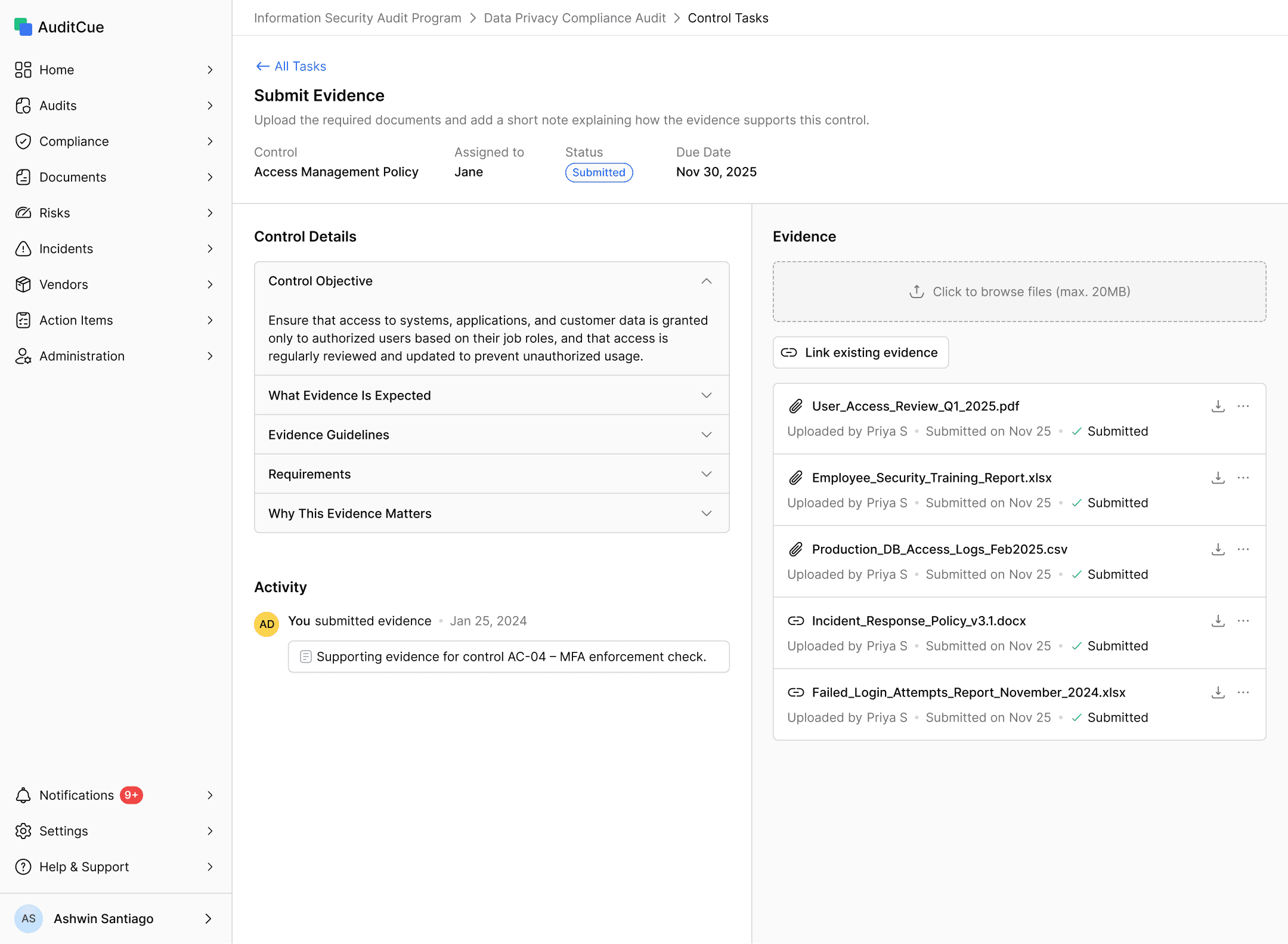
Everything they intend to submit is visible in one place, at all times. The list shows file name, upload source, submission date, and current status for each item. Newly uploaded files and linked evidence are treated identically once added.
Why this matters
Users instantly see everything that will be submitted
Removes uncertainty before clicking “Submit for verification”
Matches how people think about documents—as a collection, not steps
2. Simplified Linking Existing Evidence
The previous reuse path required users to paginate through all historical evidence across every audit — a slow, undifferentiated list with no filtering and no bulk action.
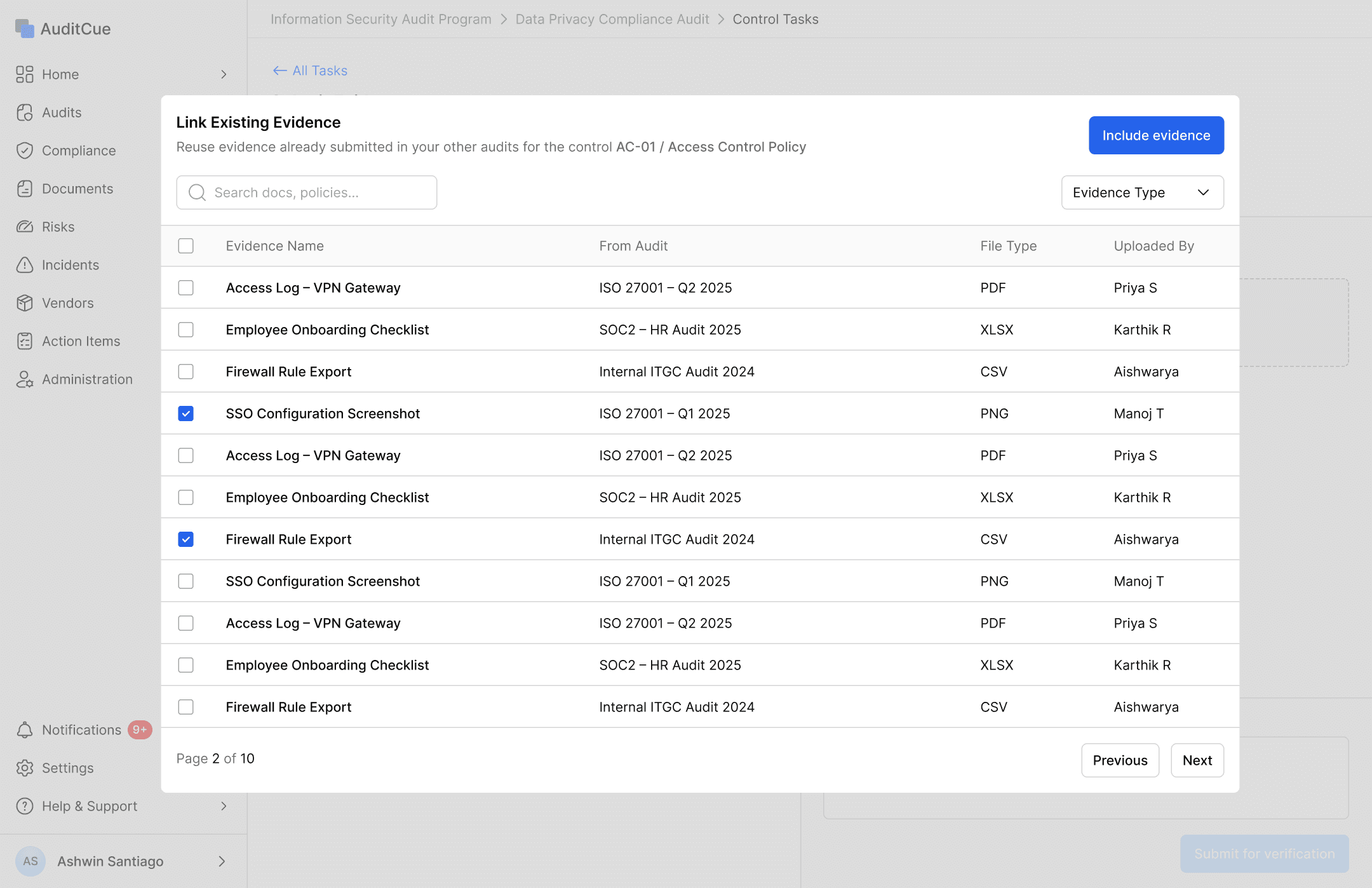
The redesigned flow replaces this with a focused overlay triggered by the "Link existing evidence" button. The overlay surfaces evidence filtered to the same control, supports search by name, and allows multi-selection in a single action.
Why this matters
Treat reuse as a shortcut, not a separate workflow
Reduce repetitive clicks and navigation fatigue
Support real-world behavior where users already know what they want to reuse
Review Model
When I evaluated the verification flow from an auditor’s perspective, I realized their core responsibility was not simply to “approve evidence.”
Their real job was to:
Validate completeness and correctness - Is the right evidence here, for the right period, proving the right thing?
Identify gaps quickly - Flag issues early, before they cascade into resubmission cycles that delay the whole audit.
Provide actionable feedback - Give auditees exactly what they need to fix — not a generic rejection that leaves them guessing.
Maintain audit traceability - Every decision must be attributable, timestamped, and defensible to an external assessor months later.
The existing flow focused on finishing steps, not on making review decisions easier or better.
Identifying the Problem
By walking through real audit scenarios, a few structural problems became clear:
Evidence review was linear and mandatory - Auditors had to click through every evidence page. Even if only one document needed changes, they still had t o navigate the full sequence
Decision-making was delayed - “Accept all” or “Refer back” actions were available only at the end. This forced auditors to remember issues instead of acting immediately
Feedback lacked precision - Comments existed, but they were detached from task-level outcomes. Auditors couldn’t clearly signal what exactly needed correction
This made verification feel mechanical rather than analytical.
Adopting a List + Detail Review Model
The core structural fix was switching from a step-by-step flow to a split-panel layout: a unified evidence list on the left showing all submitted documents at once, and a detail panel that opens when the auditor selects any file — showing a preview, notes from the auditee, comments, and action buttons.
This meant auditors could see the full evidence set the moment they arrived at the review screen. They could scan everything, immediately identify what needed attention, and jump directly to a problematic file — without being forced to work through items in the order the system dictated. No forced sequence. No pagination. No memory load.
This allowed auditors to:
Scan the full evidence set at a glance and prioritise their own review order
Jump directly to problematic files. No clicking through clean ones to get there
Maintain context while reviewing
Evidence Level Decision
When auditors rejected evidence, the system sent a single blunt signal back to the auditee
No explanation of what was wrong,
No indication of which file was the issue,
No guidance on what a correct submission would look like.
Auditees were left guessing, and the back-and-forth that followed was adding days to audit cycles.
I walked through real rejection scenarios with both auditors and auditees to understand what information was actually missing on both sides. It became clear the problem wasn't just a missing field — it was a missing mental model. The action needed to shift from a system event to a communication moment.
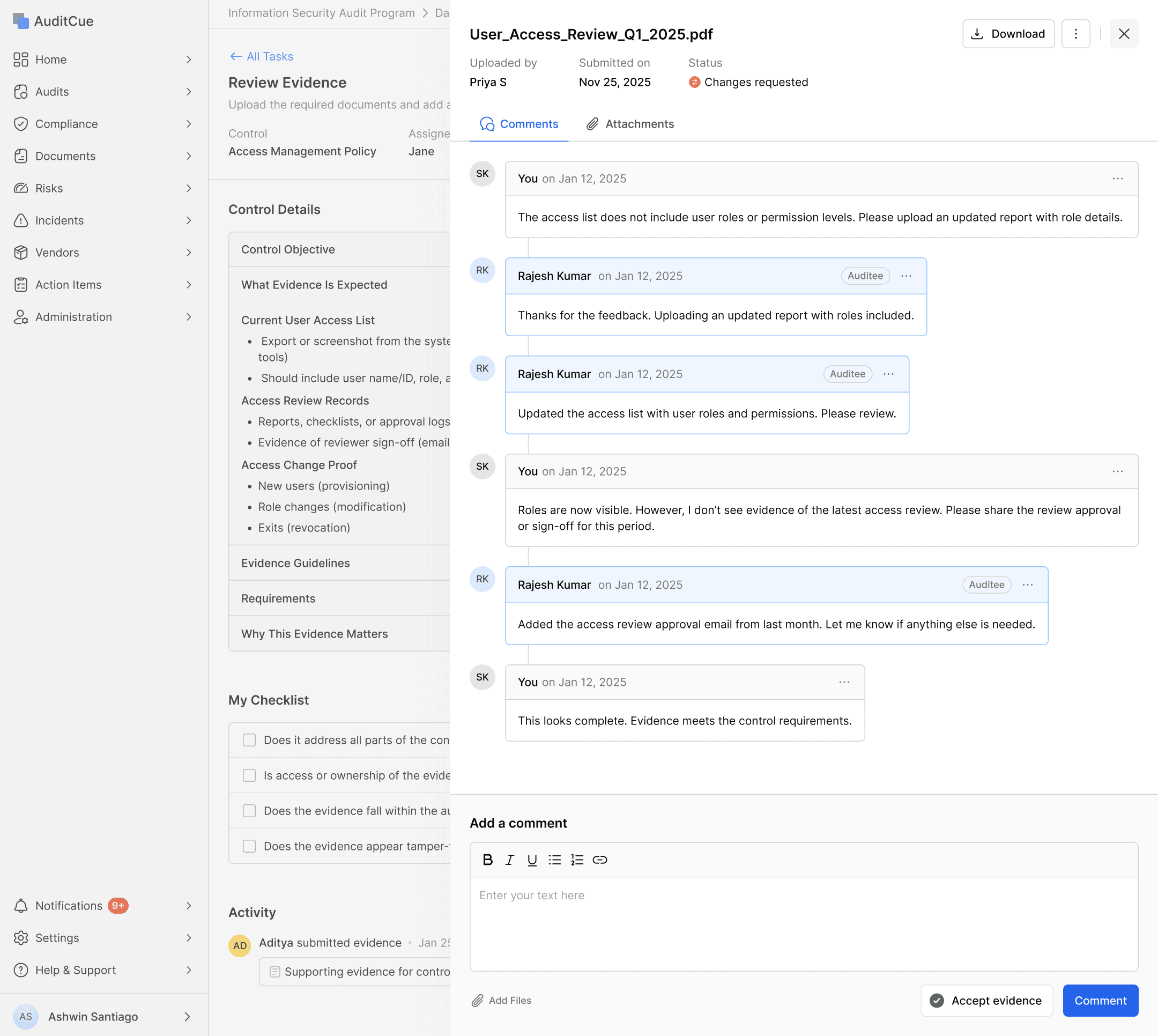
I redesigned feedback as file-level decision. Auditors now write feedback directly against the specific evidence item that needs fixing, visible in a comments panel alongside the document. Auditees receive a clear, contextual note explaining what's wrong and what's needed — not a generic flag against the whole submission.
Auditees knew exactly what to fix the first time, which meant fewer follow-up exchanges and faster audit closure. Support teams also saw fewer clarification requests from auditees who previously had no idea why their evidence had been rejected.
Activity tracking
Audits don't happen in a single sitting — they stretch over days, sometimes weeks, with multiple people involved. But when an auditor or auditee needed to understand what had happened on a task — what was submitted, what was flagged, what changed and when — there was no single place to look.
Actions were scattered across comments and status updates, and piecing together the history of a task meant hunting across multiple places. Accountability was unclear, and context kept getting lost.
I mapped the key actions that mattered most to both sides and focused on surfacing them in a way that was readable at a glance, not just technically stored somewhere.
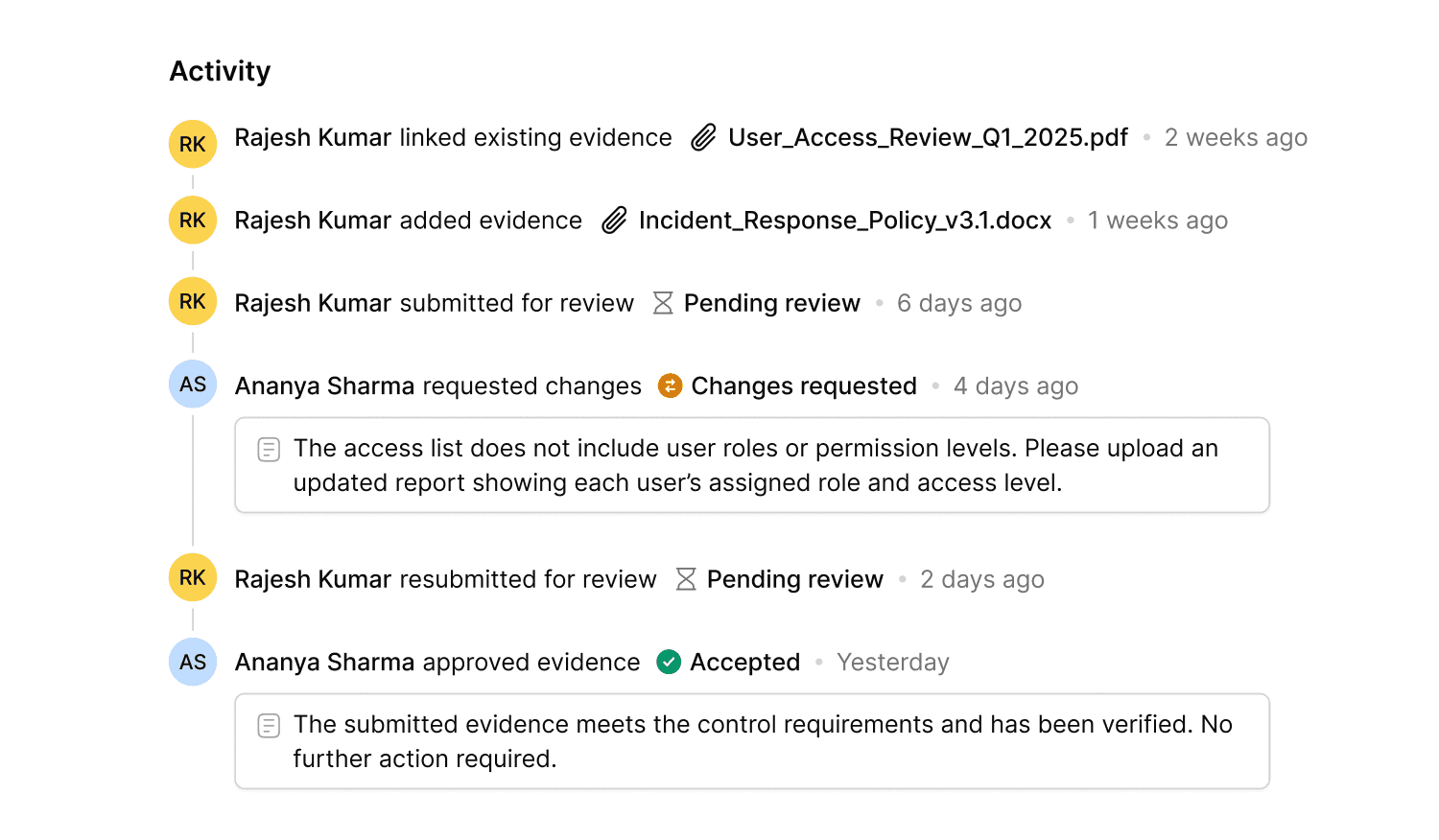
I designed an activity log embedded directly inside the task view. It captures every significant action in sequence — evidence submissions, review comments, change requests, and verification decisions — each timestamped and attributed to the person who took it.
The result is a live timeline that builds itself as the audit progresses, giving both auditors and auditees a complete, shared picture of where things stand and how they got there.
Outcomes & Impact
Following handoff and implementation, the redesigned evidence collection workflow produced measurable improvements across the key friction areas identified in research.
~35–50% reduction on evidence related support tickets
~20–35% fewer resubmission cycles
Qualitative Feedback
Auditees reported feeling more confident in what they were submitting — they knew what was expected before uploading.
Auditors noted that the review interface made it much easier to manage multiple audits simultaneously without losing track.
The internal audit team observed a significant drop in clarification requests during active audit periods.
Evidence reuse was highlighted as a time-saving feature, especially by teams managing annual or recurring compliance cycles.